How to vet an expired or second-hand domain before you buy it
Published
An expired or second-hand domain can save you years: links that already point at it, a name people remember, sometimes a little search history. It can also bring a spam past, a penalty, someone else’s trademark or a stream of strangers’ email. The listing will show you a single authority number and a price. Neither tells you which kind of domain you are looking at.
This is the checklist we would work through before paying for a domain. Most of it uses free, public sources, and none of it needs the seller’s cooperation except the last step on search penalties. Budget ten minutes for a cheap domain and an hour for an expensive one.
First, decide what you are buying it for
Write one sentence before you look at any numbers: “I want this domain for a new product”, “to redirect into my existing site”, or “for its name alone”. It changes what matters. If you only want the name, link history is a curiosity and trademarks are everything. If you plan to keep the old pages alive or redirect them, the link profile and the site’s past become the whole point, and the rest of this list applies in full.
1. Read the history, not today’s score
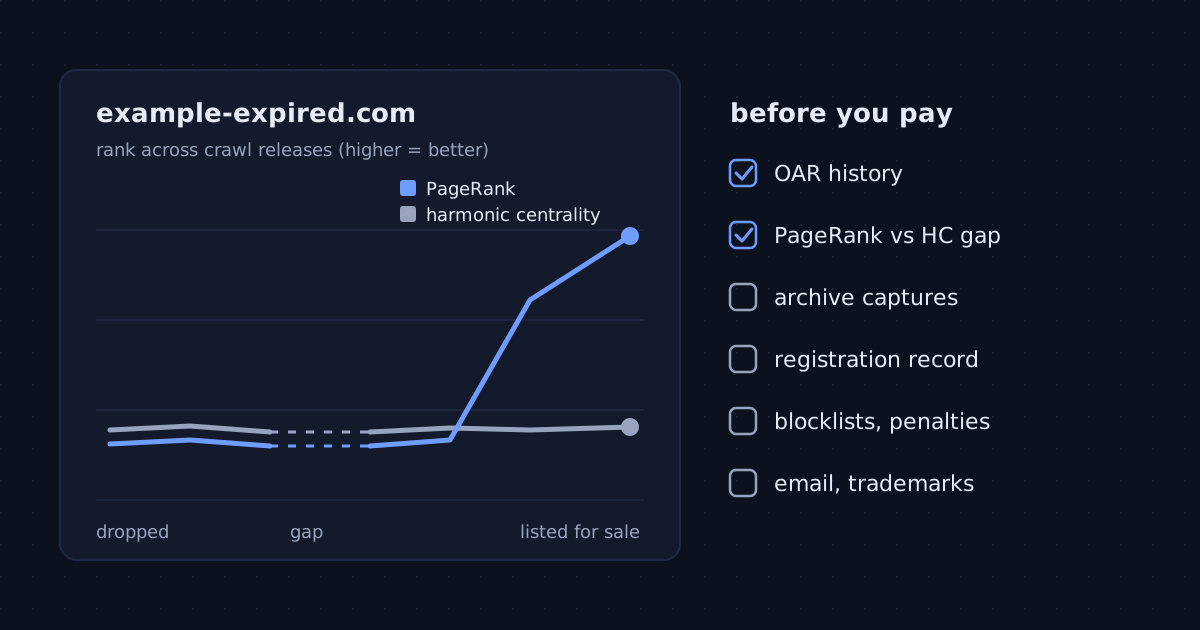
A single score is a snapshot. What you want is the shape of the line. On a domain’s page here, the chart of OAR across crawl releases shows how the domain’s position in Common Crawl’s public link graph moved from one release to the next, and dashed marks show releases where the domain was not in the graph at all.
Three patterns are worth stopping for:
- Gaps. A domain that vanished from the graph for several releases and then came back often expired, sat parked or empty, and was picked up again. That is not disqualifying, but the links you see now may be leftovers that nobody maintains.
- A sudden jump. A rise of many points between two releases, with no launch or press coverage to explain it, usually means someone bought or built links shortly before the sale.
- A slow slide. A steady decline means sites that linked to it are disappearing. The number you pay for today is likely to keep falling.
Remember that OAR is relative to each release’s graph: a small move can come from the web around the domain changing. Look for clear steps, not wobbles of a point or two.
2. Compare the two ranks
Each domain page lists two ranks: harmonic centrality and PageRank. They react very differently to manipulation, which makes the pair more useful than either alone. Harmonic centrality measures how close a domain is to the rest of the web, so raising it takes links from many places that are themselves well connected. PageRank also counts links, but a dense cluster of low-value domains linking to one target can push it up while barely moving harmonic centrality. That is the textbook link-farm signature, and it is why our rating weights harmonic centrality at 0.7.
So look at the gap. When both ranks sit in the same neighbourhood, the domain’s links look like ordinary web links. When the PageRank rank is far better than the harmonic-centrality rank (say, the top million on one and tens of millions on the other), treat it as a question to answer before you pay: where do those links come from? A backlink tool, or simply visiting a sample of linking sites, usually answers it quickly. There is no fixed threshold; the bigger the gap, the more it needs explaining.
3. See what the site used to be
The Internet Archive’s Wayback Machine keeps dated captures of most sites that had any audience. Open the calendar view and step through the years. You are looking for changes of owner and topic. A local bakery that became a casino affiliate in 2023 and then went quiet is a different purchase from a bakery that simply closed.
Specific things to check in the captures:
- pages selling pills, loans, gambling or adult content the domain’s name never suggested;
- sudden pages in a language the site never used, a common sign it was hacked;
- a final period of thin, spun articles stuffed with outbound links, which is how expired domains are often squeezed for value before they drop.
Then search the web for the domain name in quotes. Forum threads, scam warnings and old news coverage turn up faster that way than in any tool.
4. Check the registration record
Look the domain up on ICANN’s registration data lookup (lookup.icann.org), which queries the registry over RDAP, or on your registrar’s own lookup for country-code domains. Note the creation date, the registrar and any status codes. A creation date of last month on a domain whose archive goes back ten years tells you it dropped and was re-registered, and age-based claims in the listing do not carry over. Statuses such as “redemption period” or “pending delete” mean the domain is not really the seller’s to sell yet.
Ask how the handover will work. Registrars commonly block a move to another registrar for a period after a new registration or a previous transfer (traditionally 60 days for generic domains), so plan to use an escrow service or a change of account at the same registrar rather than paying first and hoping.
5. Look for blocklists and search penalties
Two free checks catch most security baggage: Google’s Safe Browsing site status in the Transparency Report, and the Spamhaus domain reputation lookup. A listing on either means browsers or mail servers may already treat the domain as dangerous, and getting off a list takes time even after the cause is gone.
Search penalties are harder to see from outside. Searching for site: followed by the domain shows whether any pages are indexed, but only Google Search Console shows manual actions. For a domain worth real money, ask the seller to add you as a user on its Search Console property for a day, or to share the Manual actions page. A seller who refuses has told you something too.
6. Think about email before you switch it on
If the domain once had people working at it, mail to their old addresses may still arrive once you set up MX records. Newsletters are harmless; password resets, invoices and personal mail are not yours to read. Do not set up a catch-all inbox on a second-hand domain. Create only the addresses you need, and bounce the rest.
7. Rule out trademark trouble
A domain that matches a registered brand can be taken from you through a UDRP complaint, however much you paid. Search the name in TMview (which covers the EU office and most national offices) and in the USPTO’s trademark search if you serve US users. A match in an unrelated industry is often fine; a match in yours is a reason to walk away or talk to a lawyer first.
Keep a record of what you saw
Whatever you decide, save what you checked: screenshots of the registration record, the archive captures, the domain’s OAR history and the seller’s listing. If the sale goes wrong, or a dispute arrives a year later, a dated record of the domain’s state at purchase is worth having. A sealing service such as XSeal can timestamp and sign that file, so you can later prove it has not changed since the day you bought.
The ten-minute version
- Write down what you want the domain for.
- Open its OAR history: look for gaps, jumps and slides.
- Compare its PageRank and harmonic-centrality ranks; explain any big gap.
- Step through its Wayback Machine captures for topic changes and spam.
- Check the registration record for re-registration and blocking statuses.
- Run Safe Browsing and Spamhaus; ask for Search Console access if the price is high.
- Plan email: no catch-all.
- Search the name in TMview and, for US users, the USPTO.
- Save everything you looked at.
You can look up any domain to start with steps 2 and 3, or compare two candidates side by side. For what the authority numbers can and cannot tell you, read why domain authority scores disagree.
This article is general information, not legal or financial advice. OAR measures a domain’s position in the public link graph; it does not measure content quality, traffic or trustworthiness, and it predicts nothing about search rankings.